
|
MySQL Edit Restricted User |
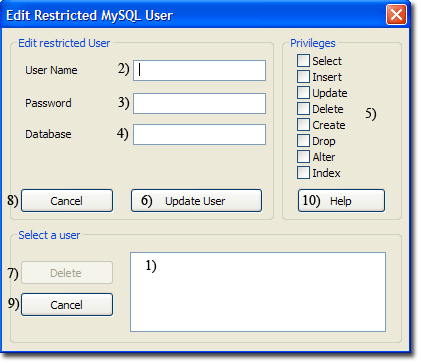
There are three methods for editing a restricted user; you can use UniController, phpMyAdmin or MySQL Prompt. UniController provides a convenient menu option described bellow. To use this option ensure the MySQL server is running otherwise a warning message is produced.
Edit Restricted MySQL User using UniController
MySQL > Edit restricted MySQL User
|
Edit Restricted User
Delete Restricted User
|
|
Edit Restricted MySQL User using phpMyAdmin
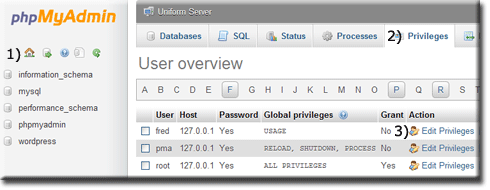
Start Controller and start both servers, then click phpMyAmin button. To edit a restricted user, proceed as follows:
Note: Assume the user fred has already been created.
|
When first started the phpMyAdmin home page is displayed; you can
From this page you can change the user privileges, the database(s) the user is assigned to and privileges, password and login information. |
|
Edit Restricted MySQL User using MySQL Prompt
Editing an existing user with restricted privileges can be performed using the MySQL Client.
You can use REVOKE to remove some or all privileges or alternatively use GRANT to add additional privileges. This example assumes a user fred has been created with the privileges GRANT SELECT, INSERT, UPDATE, DELETE assigned on database wordpress.
You can revoke (remove) privileges; for example, the following command removes INSERT, UPDATE and DELETE.REVOKE INSERT, UPDATE, DELETE ON wordpress.* FROM 'fred'@'127.0.0.1' ;
GRANT INSERT, UPDATE ON wordpress.* TO 'fred'@'127.0.0.1' ;
SHOW GRANTS FOR 'fred'@'127.0.0.1';
Example for the above commands. Open MySQL prompt window click MySQL Console button. Then enter the following commands:
SHOW GRANTS FOR 'fred'@'127.0.0.1';REVOKE INSERT, UPDATE, DELETE ON wordpress.* FROM 'fred'@'127.0.0.1' ;SHOW GRANTS FOR 'fred'@'127.0.0.1';GRANT INSERT, UPDATE ON wordpress.* TO 'fred'@'127.0.0.1' ;SHOW GRANTS FOR 'fred'@'127.0.0.1';exit
Welcome to the MySQL monitor.  Commands end with ; or \g.
Your MySQL connection id is 26
Server version: 5.5.33 MySQL Community Server (GPL)

Copyright (c) 2000, 2013, Oracle and/or its affiliates. All rights reserved.

Oracle is a registered trademark of Oracle Corporation and/or its
affiliates. Other names may be trademarks of their respective
owners.

Type 'help;' or '\h' for help. Type '\c' to clear the current input statement.


mysql> SHOW GRANTS FOR 'fred'@'127.0.0.1';
+-------------------------------------------------------------------------------------------------------------+
| Grants for [email protected]                                                                                   |
+-------------------------------------------------------------------------------------------------------------+
| GRANT USAGE ON *.* TO 'fred'@'127.0.0.1' IDENTIFIED BY PASSWORD '*F5F0B28BD93FCF0C77FD96BB97BBC745ED8EA6BC' |
| GRANT SELECT, INSERT, UPDATE, DELETE ON `wordpress`.* TO 'fred'@'127.0.0.1'                                 |
+-------------------------------------------------------------------------------------------------------------+
2 rows in set (0.00 sec)

mysql> REVOKE INSERT, UPDATE, DELETE ON wordpress.* FROM 'fred'@'127.0.0.1' ;
Query OK, 0 rows affected (0.00 sec)

mysql> SHOW GRANTS FOR 'fred'@'127.0.0.1';
+-------------------------------------------------------------------------------------------------------------+
| Grants for [email protected]                                                                                   |
+-------------------------------------------------------------------------------------------------------------+
| GRANT USAGE ON *.* TO 'fred'@'127.0.0.1' IDENTIFIED BY PASSWORD '*F5F0B28BD93FCF0C77FD96BB97BBC745ED8EA6BC' |
| GRANT SELECT ON `wordpress`.* TO 'fred'@'127.0.0.1'                                                         |
+-------------------------------------------------------------------------------------------------------------+
2 rows in set (0.00 sec)

mysql> GRANT INSERT, UPDATE ON wordpress.* TO 'fred'@'127.0.0.1' ;
Query OK, 0 rows affected (0.00 sec)

mysql> SHOW GRANTS FOR 'fred'@'127.0.0.1';
+-------------------------------------------------------------------------------------------------------------+
| Grants for [email protected]                                                                                   |
+-------------------------------------------------------------------------------------------------------------+
| GRANT USAGE ON *.* TO 'fred'@'127.0.0.1' IDENTIFIED BY PASSWORD '*F5F0B28BD93FCF0C77FD96BB97BBC745ED8EA6BC' |
| GRANT SELECT, INSERT, UPDATE ON `wordpress`.* TO 'fred'@'127.0.0.1'                                         |
+-------------------------------------------------------------------------------------------------------------+
2 rows in set (0.00 sec)

mysql> exit
Bye

C:\UniServerZ\core\mysql\bin>